
Transparent LCD Showcase Interactive Content Layer: Deployment Scenarios That Add Value Without Overwhelming the Showcase
Transparent Lcd Showcase Interactive Content Layer is the decision framework examined in this guide. The sections below turn sourced evidence into practical comparison criteria without overstating what the available research can prove.
A transparent LCD showcase becomes valuable only when the content layer on the glass earns its place. This guide maps which content scenarios fit which retail context, and gives you the balancing rule — white renders transparent, black renders opaque, everything else translucent — that keeps legibility high without hiding the product. It is the fourth article in the transparent-LCD series: where the buyer’s guide, ambient-light specification, and CMS/SoC compatibility checklist stop at hardware, this one covers the live content-and-experience layer. It covers what to show, where to place it, and how to keep it legible; it intentionally does not restate the hardware and software checklists in those briefs. The timing is practical: the 2026 retail-automation conversation has moved past pilots toward embedded interactive technology as a baseline expectation, which is why venues should shift from static display toward engagement today.
Why the Content Layer, Not the Hardware, Decides the Showcase
A transparent LCD showcase interactive content layer is the make-or-break element of any deployment: the panel is transparent, but what you draw on it decides whether shoppers see the product, the message, or neither. Getting this right matters now because embedded interactive technology is becoming the baseline for retail automation, not a differentiator [2]. The physical hardware is near-identical across vendors; the experience lives in the content. This section frames the trade-off you will weigh through the rest of the guide, and the three scenarios that follow give you a concrete starting point for the interactive retail display in your space.
Teams comparing implementation options can also consult wintouchtech.com.
The Transparency-Versus-Legibility Trade-Off
Every transparent display forces a choice between transparency and legibility — how much you can see through the glass versus how clearly content reads on it. Displaying graphics on a transparent LCD screen requires external or internal enclosure lighting to illuminate the liquid-crystal layer from behind [2], so the panel’s behavior is governed by one emissive rule that anchors your entire design:
| Content color | On-panel result |
|---|---|
| White | Renders transparent — product stays visible |
| Black | Renders opaque — blocks line of sight |
| Any other color | Renders translucent — partially restricts viewing |
Format content in white to appear transparent, black to appear opaque, while any other color appears translucent and restricts viewing into the case [4]. Set your expectations from the spec sheet: most transparent LCD display case models offer 80-85% transparency, an attributable commercial range rather than a tested figure [3]. Emissive content design rules therefore start with this spectrum: place critical content on the white/transparent end whenever the product must dominate.
Choosing the Right Scenario: A Decision Framework
Before you design pixels, decide which element must dominate the showcase: the product or the message. Use this rule of thumb — if the physical item carries the sale (watches, jewelry, cosmetics), run a product-hero scenario where content stays thin and white; if the item needs explanation to sell (electronics, options-heavy goods), run a message-hero scenario where content may sit more opaque. The scenario map below turns that one decision into concrete content choices.
Scenario 1: Product-Hero Luxury Showcases
Luxury retail is the most mature deployment environment, and it lives on the transparent end of the spectrum: shoppers see the physical item while animated graphics explain features without obscuring craftsmanship [5]. For watches, jewelry, and cosmetics, keep the interactive content layer thin and white, and overlay specifications, price, and promotions only on touch. This interactive transparent LCD showcase retail model drives engagement on demand — the product stays dominant until the shopper asks for detail — which suits high-value items whose craftsmanship is the sale.
Scenario 2: Message-Hero Electronics and Options
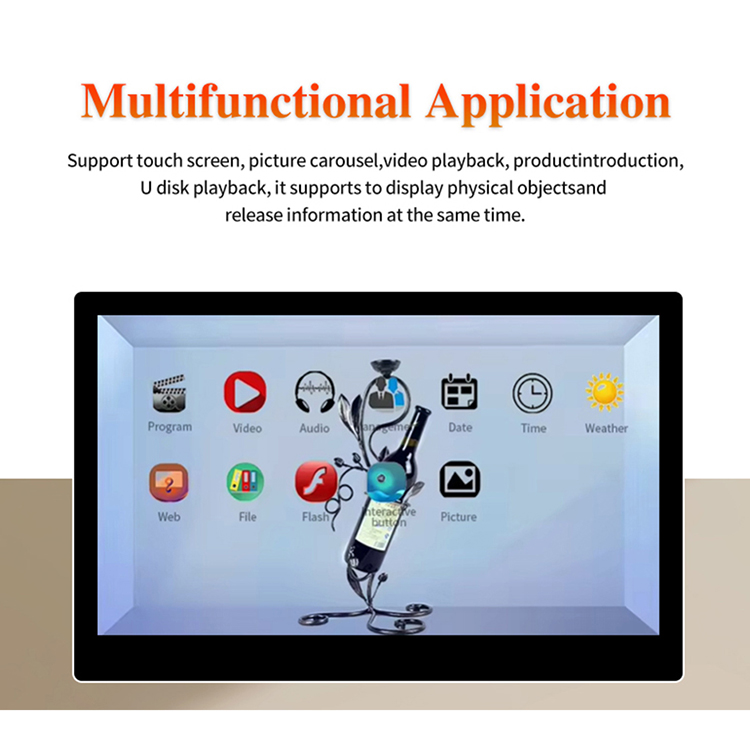
Consumer electronics invert the rule: the product looks identical across most competitors, so the message does the work. Use the interactive transparent LCD showcase retail surface for catalog browsing, specification exploration, and color or comparison toggles, where content can sit more opaque because the line of sight matters less than the explanation. A transparent touchscreen display showcase supports interactive product catalog browsing and detailed specification exploration [2]. Keep the system touch-driven so engagement happens on demand and the panel clears back to transparent when idle.
Scenarios 3-5: Museums, Hospitality, and Trade Shows
Beyond retail, three adjacent scenarios reuse the same panel with different content. In museums, the transparent display lets visitors view the artifact behind the screen while it provides contextual information, videos, or interactive stories [1] — keep ambient lighting conditions dark enough for white content to read without flooding the artifact. In hospitality, run menu boards and wine displays that pair physical bottles or dishes with descriptions and pairing suggestions, overlaying an interactive touch overlay only when a diner leans in. In trade shows, run interactive product demos, but add an engineering note: power at convention centers is rarely voltage-stable, and transparent panels at high brightness are sensitive to undervoltage, so specify an inline power conditioner and pre-load looping content rather than relying on congested show-floor internet [5].
Design Rules for Content That Stays on the Glass
These five rules carry the transparency-versus-legibility balance across every scenario, drawn from the emissive and touch-overlay evidence:
- Layer white for transparency. Reserve white fill for everything that must stay see-through; it keeps the product dominant and meets the emissive rule above.
- Respect translucency limits. Non-white, non-black colors render translucent — use them sparingly, only where partial blockage is acceptable.
- Match interior lighting to the white point. Dark or matte products reduce effective contrast at the panel surface; match interior LED color temperature to the panel’s white point to prevent color fringing around product edges [5].
- Choose the touch overlay deliberately. PCAP and Infrared options both deliver a memorable interactive experience; pick based on glove use, size, and reliability needs [4].
- Design for touch responsiveness. Keep touch targets large and content on the interactive transparent display showcase free of parallax error so taps register every time.
Tying the Content Layer to CMS and Site Context
The content layer does not stand alone — it pulls from, and is limited by, the systems covered in the linked briefs. Plan the interactive content and walkthrough layer against the content management software (CMS) and SoC compatibility checklist so the scenarios above run on infrastructure you already control, and validate the ambient-light specification wherever the display sits. Where local or regulatory context applies to your region, fold that in alongside the buyer’s guide. The transparent LCD showcase interactive content layer is your last, lowest-cost decision in the series — get it right and the hardware earns its space. Ready to review a deployment in your venue? Contact us to discuss the scenarios that fit your floor plan.
Teams comparing implementation options can also consult About Wintouch, Touchscreen Manufacturer in China · Wintouch.
Related guides
- Transparent LCD Showcase Buyer’s Guide for Retail Procurement
- Transparent LCD Showcase Ambient Light Specification Guide: Contrast Ratio, Reflectance & Viewing Angle
- Transparent LCD CMS & SoC Compatibility Checklist
Content reviewed: 2026-08-09.
Evidence confidence
Confidence: Medium. This rating reflects cross-checking 5 sources across 5 independent domains. It measures evidence coverage, not certainty; verify safety-critical work against manufacturer instructions and local requirements.
References
APA 7th edition
- ↑EKAA. (2024). How Do Transparent LCD Showcase Work?. https://www.ekaa.net/how-do-transparent-lcd-showcase-work.html.
- ↑Cited 3 timesRcstarsgroup. (2026). Transparent Touch Screen Monitor &. https://www.rcstarsgroup.com/blog/transparent-touch-screen-monitor-digital-signage/.
- ↑Miqidisplay. (n.d.). Transparent LCD Display Cases: The Future of Interactive. Retrieved August 9, 2026, from https://miqidisplay.com/blogs/transparent-lcd-display-cases-the-future-of-interactive-retail-and-advertising.html.
- ↑Cited 2 timesTactiledisplay. (n.d.). Transparent LCD Showcase and Screen Solutions for Innovative Displays. Retrieved August 9, 2026, from https://www.tactiledisplay.com/lcd-led-screens/transparent-screens/transparent-lcd-showcase.
- ↑Cited 3 timesGoogle. (n.d.). Transparent LCD Displays: A Buyer's Planning Guide for Commercial Deployments. Retrieved August 9, 2026, from https://docs.google.com/document/d/1OVuCDDjT40EazgSVn4CEHCbgd9KxNxHO4NIqzzdqLuA/mobilebasic.
You should also read:
Transparent LCD Showcase Ambient Light Specification Guide: Contrast Ratio, Reflectance & Viewing Angle
A transparent LCD showcase has to stay see-through while competing with storefront illumination — that tension, not the panel’s datasheet, decides whether your content is readable. Because a transparent LCD panel does not emit light on its own, it relies on a backlight and controlled…
Continue reading...
Transparent LCD CMS & SoC Compatibility Checklist
The Integration Gap No Hardware Spec Sheet Covers A transparent LCD CMS SoC compatibility checklist answers one question before you sign off: can this panel run my content management system, my network, and my content pipeline on day one? Hardware spec sheets cover transparency ratio…
Continue reading...
Transparent LCD Showcase Buyer's Guide for Retail Procurement
This transparent LCD showcase buyer’s guide walks procurement teams through the specifications that determine whether a transparent LCD installation succeeds or fails in the field. You will learn how to evaluate transparency ratios against specific retail and museum use cases, select the right touch overlay…
Continue reading...